Use BuyBotPro inside Claude
Connect BuyBotPro to Claude in about two minutes. Then ask Claude to find and analyse Amazon FBA deals in plain words, using your own BuyBotPro settings.
What you need
Your BuyBotPro API key
It starts with bbp_. We send it to you by email, or you can ask our support team for one.
A Claude account
On claude.ai, the Claude desktop app or the mobile app. On Team and Enterprise plans an owner may need to allow custom connectors.
1Create your connection URL
Your connection URL is our server address with your API key added to the end. Paste your key below and we will build it for you. Your key stays in your browser and is not sent anywhere.
Use the full key, including bbp_, with no spaces or quotes.
2Add the connector in Claude
You add the connector once, on claude.ai or in the Claude desktop app. It then works on the web, desktop and mobile apps with the same Claude account.
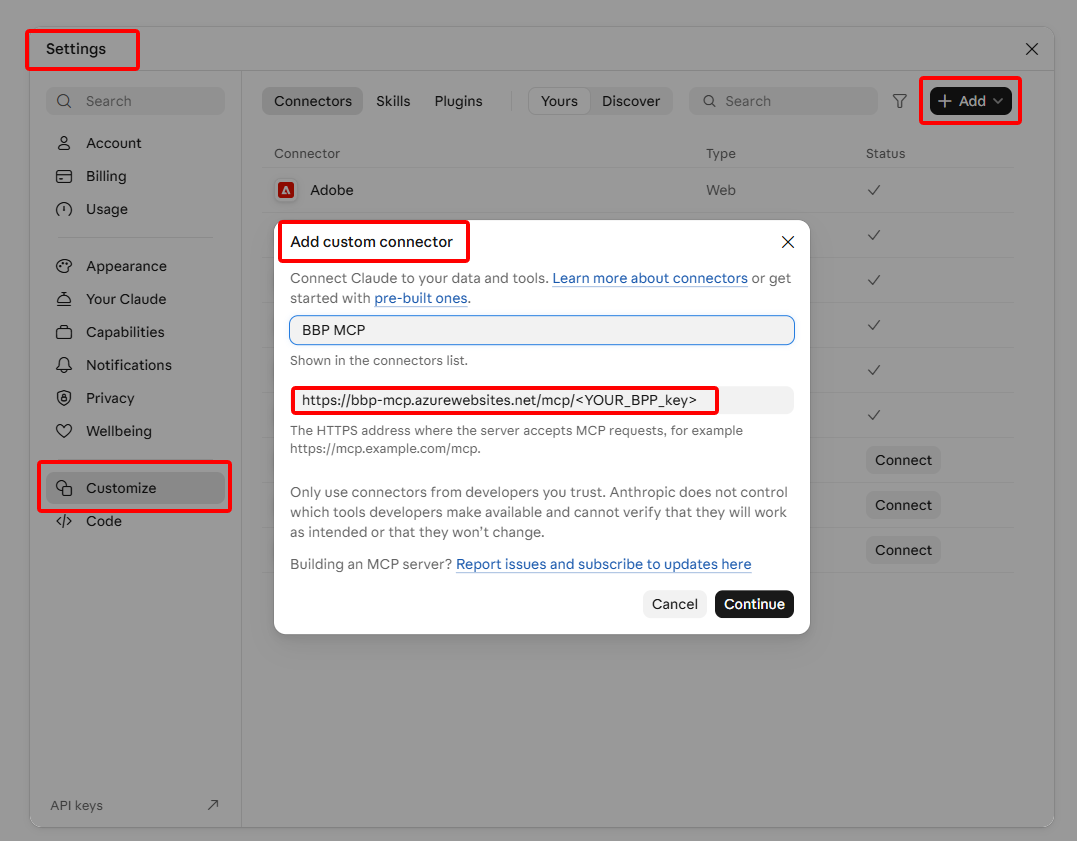
- Open Claude and go to Settings.
- Select Customize in the left menu, then the Connectors tab.
- Click + Add at the top right and choose Add custom connector.
- Enter a name, for example BuyBotPro.
- Paste your connection URL into the URL field.
- Leave the advanced (OAuth) settings empty and click Continue.
BuyBotPro now appears in your connectors list. In a new chat, open the + (tools) menu and check that BuyBotPro is switched on.
3Try it
Start with this message to check the connection. If Claude lists your marketplace, VAT type and fees, you are connected.
Then ask in your own words, for example:
Profit, ROI and fees always come from BuyBotPro with your settings. Each search uses part of your daily token budget, so specific requests go further than broad ones.
Claude Code (for developers)
If you use Claude Code in a terminal, add BuyBotPro with one command. Claude Code also picks up a connector you already added on claude.ai.
Other MCP clients that can send headers can use https://bbp-mcp.azurewebsites.net/mcp with the header Authorization: Bearer YOUR_API_KEY.
Troubleshooting
| What you see | What to do |
|---|---|
| “Missing, revoked or expired BuyBotPro API key” | Check the URL: the key must follow /mcp/ in full, starting with bbp_, with no spaces. If it is correct, ask support for a new key. |
| Claude does not use BuyBotPro | Open the + (tools) menu in the chat and switch BuyBotPro on. |
| “Too many requests” | Wait one minute and ask again. No tokens were spent. |
| Daily token budget used up | Your budget resets the next day. Narrower searches use fewer tokens. |
| No option to add a custom connector | Your plan or your organisation's settings may not allow it. Ask your Claude workspace owner. |